Updates
fjord checks the registry for every stack and says what an update would change before you take it. Nothing is applied on its own in 0.3: you tick, you press Update, and fjord tells you whether it worked by looking at the containers, not at an exit code.
1. What the panel says
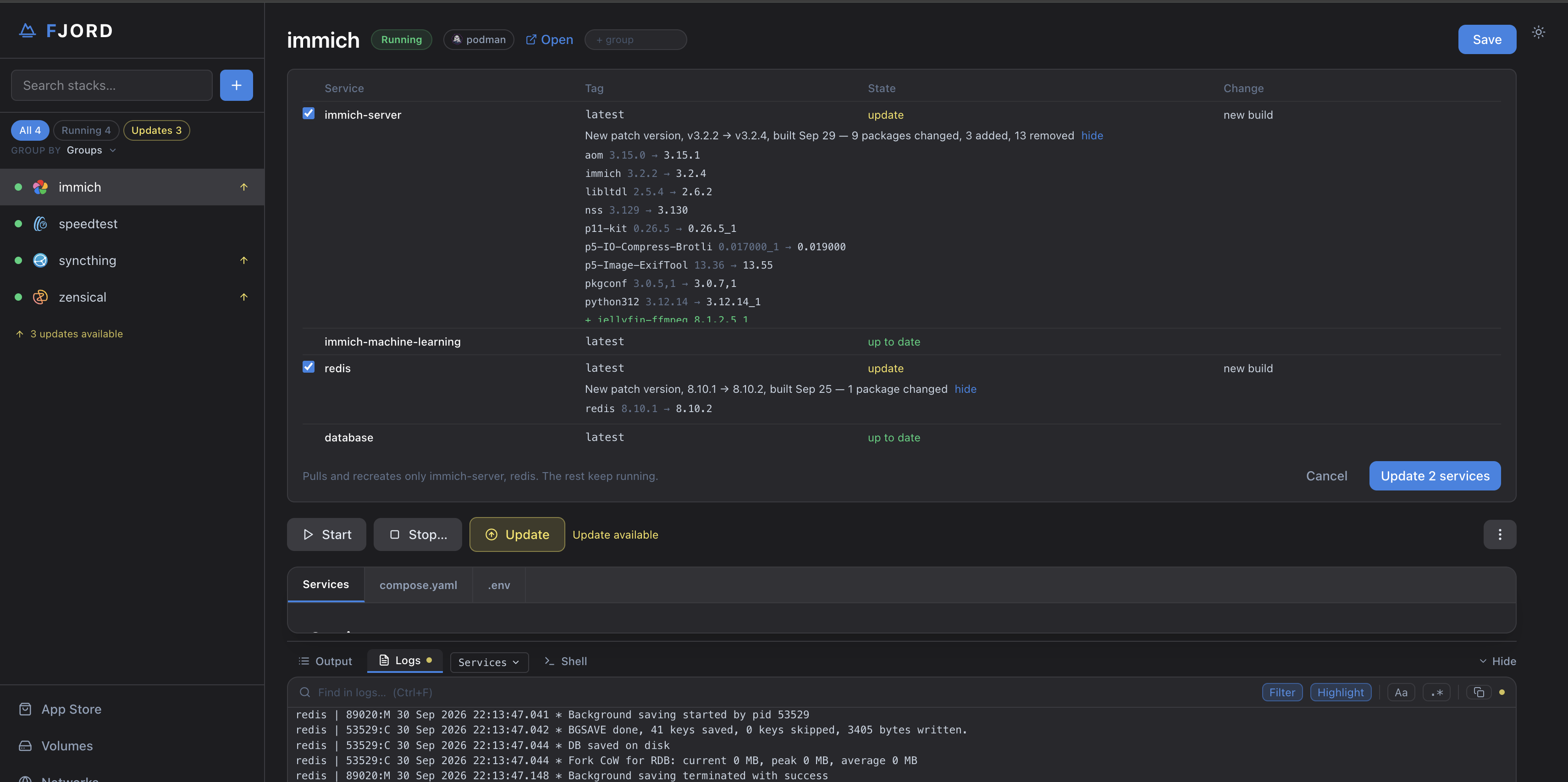
Update on a stack page opens the panel. For each service with something newer it says, in plain words, what kind of change it is:
- New build of the same version — the image was rebuilt (packages changed); the app is the same version.
- Patch, minor or major — a version bump, with the versions named.
The SBOM behind each image is what tells fjord this. Tick the services you want, or all of them, and press Update. Updating some services leaves the others on what they were started with.
2. Picking a version
Change Version… in the stack's menu (⋮) lists the image's release trains
(latest, pkg, pkg-latest, or per major for images that publish one
train each) and the versions published in each. Pick one, or type a tag.
- Pin to exact image locks the stack to the digest that tag points to right now, so a re-published tag cannot move it. Update does nothing on a pinned stack until you unpin.
- A tag with no build for this host (an
amd64-only tag on anarm64host) is said under the picker and the button stays disabled. If one gets through some other way, fjord pulls the image, looks at what it is built for, and stops before anything is torn down: the stack keeps what it runs.
3. After an update
An update pulls, then recreates the containers so the new image is really the one running. fjord then checks:
- Each container is new. podman-compose can refuse a recreate (an open exec session holds the old container), start the old one again and exit
- fjord asks the containers instead; a refused teardown is force-removed and retried.
- It stays up. For 30 seconds after the update fjord watches the new containers. One that exits or restarts marks the update failed, with the reason in the Output.
Roll back on a service returns it to the previous image from the registry, the same way an update runs.
4. Apply after a Save
Editing compose.yaml or .env and pressing Save does not touch the
running containers; the page says so in a banner. Apply Changes
recreates exactly the services the Save changed, checks each was replaced,
and watches them like an update. If the recreate fails, the banner stays and
says why.
5. When something fails
- While a stack is installing or updating, its buttons are greyed and say so; a second action is refused until it finishes.
- A failed install, start, update or restart leaves a red banner on the stack page with the reason, and a line in fjordd's log, until the next action on that stack succeeds. The full output is in the Output tab while the page is open.
- A service with no container says so in grey. Yellow means a state fjord did not expect; the row's state text says which.
6. AppJail stacks
In 0.3 an AppJail stack updates as a whole: appjail-director rebuilds the project. There is no per-service update, no rollback, no version change and no health watch for jails yet. AppJail parity is 0.3.5.