Networking
Every service in a stack is somewhere on a network. fjord offers four places, and the Services tab of each stack shows and changes where each service is.
1. Where a service can live
| Network | Reached at | Good for |
|---|---|---|
| bridge (default) | this host's address, on the ports the service publishes (http://host:8181) |
most apps; nothing to set up |
| host | this host's address, on the ports the app binds itself | apps that need the host's network directly (DHCP servers, discovery) |
| LAN | an address of its own on your network (http://192.168.5.25) |
apps you want reachable like another machine: own DNS name, own DHCP reservation, no port clashes |
| private | only by the other services of the same stack | a database or cache that nothing outside the app should reach |
A service can be on more than one: a typical multi-service app puts its web front end on the LAN and its database on the stack's private network, so the database is reachable by the app and by nothing else. A one-service app gets no private network.
Each service has a Type on the Services tab: networks (one or more interfaces, each on a network), host (this host's own network stack), or none (no network at all). Switching to host and back keeps the interfaces. The built-in bridge can sit next to a LAN network on one service, and a service on the bridge keeps its published ports.
flowchart TD
    subgraph LAN["LAN Network (cni-epair)"]
        Frontend["Web Frontend: 192.168.5.25"]
    end
    subgraph Bridge["Host Bridge (cni-rdr / PF)"]
        PubService["Service on Bridge: host:8181"]
    end
    subgraph Private["Private Stack Network (cni-dnsname)"]
        DB["Database / Redis Sidecar"]
    end
    Frontend -->|Internal DNS| DB
    PubService -->|Internal DNS| DB
Private is not isolated yet
In 0.3 "private" means not reachable from your LAN. Stacks on the same host can still reach each other's private networks; isolation is 0.3.6.
Bridge needs pf
Ports published on the bridge network go through pf's rdr anchors. The System page checks for them; see Troubleshooting.
2. LAN networks
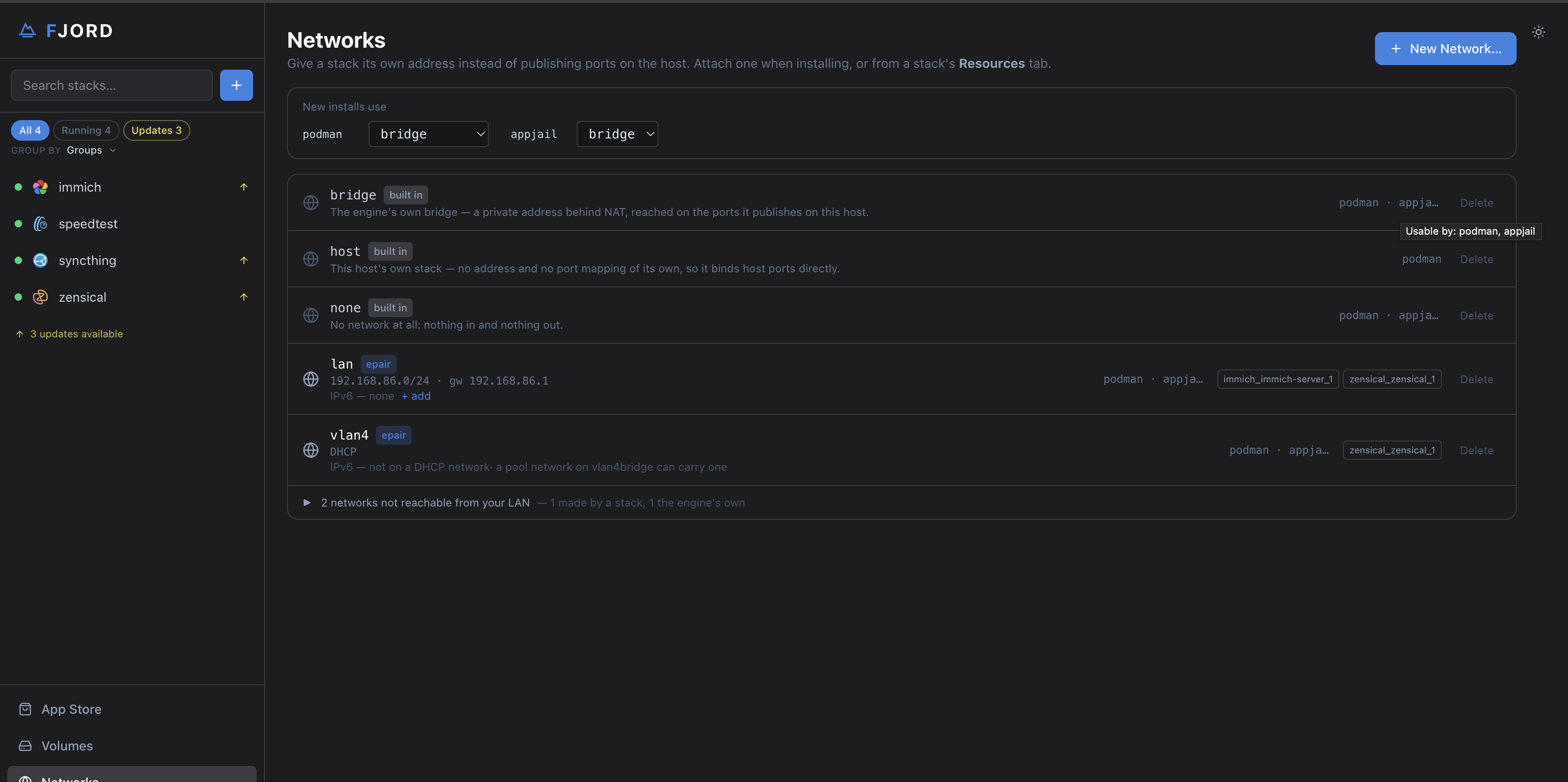
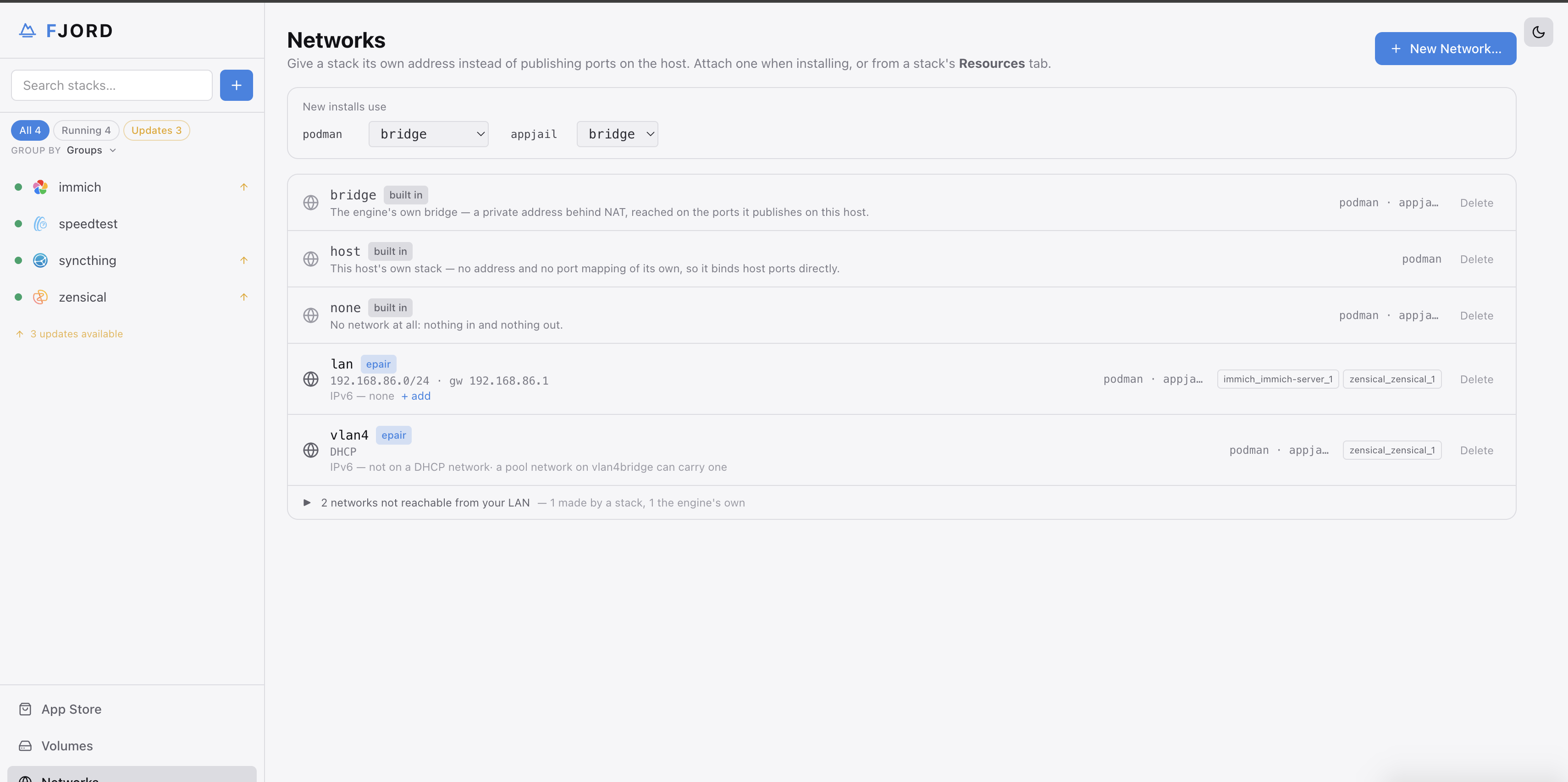
A LAN network gives a container its own address on one of the host's bridges, as if it were another machine plugged into the same switch.
What it needs on the host
- The cni-epair plugin:
pkg install cni-epair(the fjord package already has it). Without the package, fjord offers an Install button in the setup wizard and on the System page (see Installation). - A bridge with the host's network card (or a VLAN on it) as a member. If the
host has none, Networks → New network shows the exact commands to create
one, both for now and in
rc.conffor every boot.
Creating one: Networks → New network, pick the bridge, give it a name, and choose where its addresses come from (next section). Stacks can then be put on it from the install wizard or the Services tab.
The wire check. When you pick a bridge the host has no address on, fjord asks its DHCP server what the network is (a caged probe through a throwaway interface) and fills in the subnet and gateway. A subnet that is not on that wire is refused, with the reason next to Create. The answer is kept across restarts and asked again daily; a network that disagrees with its wire is flagged on the Networks page and in the install wizard. Where nothing answers, fjord says so and lets you type the subnet.
Where addresses come from
- DHCP (the default where the plugin supports it): your router hands out the address, the same way it does for any other device. fjord records the service's MAC address, so the router keeps giving it the same lease; add a reservation for that MAC on the router to make it permanent.
- Pool: fjord hands out addresses from a range you choose. Pick a range
your router's DHCP server does not use, and keep your fixed addresses
outside it (for example, fixed addresses in
.10–.99, the pool.100–.199). - Static: nothing is handed out; every service on the network needs an address you type in.
3. Addresses that stay put
A service keeps its address through updates, restarts and reboots:
- The first time a service starts on a LAN network, fjord writes its address
(on a pool network) or its MAC (on a DHCP network) into the stack's
compose.yaml. From then on it gets the same one every time. - An address or MAC you set yourself in the Services tab is never changed.
- An address another stack already has is refused: Save and Start say
which stack holds it (
192.168.5.19 on vlan5 is smokeping's address — give
  seerr another address in the Services tab
). - Reservations left behind by containers that no longer exist are released the next time a stack starts on that network.
- Open on a stack page goes to the service's address on your LAN, never to a private 10.x one.
- A stack's private network is removed with the stack. One left over from an earlier version reads as "left over from a deleted stack" on the Networks page and can be deleted there.
4. Finding each other by name
Services of the same stack reach each other by service name
(postgres://database:5432) on any network they share. On the podman engine
that takes the cni-dnsname plugin (pkg install cni-dnsname); without it
a multi-service app starts, fails to find its database, and restarts over and
over. The System page checks for it.
5. IPv6
A pool or static network can carry an IPv6 segment next to its IPv4 one; services on it then get an address of each. DHCP networks are IPv4 only.
6. AppJail
AppJail stacks use AppJail's own virtual networks: each jail gets an address
behind NAT, and ports are published with expose. The Networks page lists
which networks each engine can use. A jail can also be put on a LAN network,
with one interface per bridge; on a DHCP network fjord takes the lease on the
host at install and gives the jail a fixed address.
In 0.3 a jail cannot have the built-in bridge next to a LAN network, and a network added on the Services tab after install does not get the jail a second address (add both in the wizard). Jails find each other by name only when dnsmasq answers with appjail's config; the Setup page shows the commands. All of this is 0.3.5, AppJail parity.